Thursday, April 13, 2006, 07:21 PM - howtos
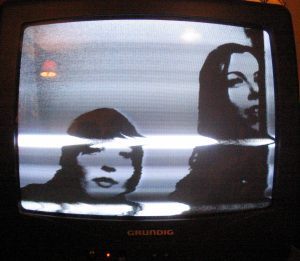
fellow Kiwi Adam Hyde just sent through some snaps of a little workshop conducted in Lotte Meijer's house in Amsterdam over the snowy new-year.
we spontaneously decided to make TV transmitters according to a plan devised by Tetsuo Kogawa, a mate of Adam's. Adam and Lotte had the gear, so we got busy.
Marta, Adam, Lotte and I each soldered a board up, but Lotte's worked the best. the board has a little variable resistor for tuning channels and to our complete astonishment gave us a near perfect colour reception with a composite cable from a DVCam hardwired onto the board. we got around 10m of range between the transmitter and the TV before the signal was lost due to occlusions in the house itself. with a few boosters used in serial this range would be (hypothetically) exponential.
fun and games - build one yerself!
| permalink
Monday, March 27, 2006, 12:53 AM - live

Thursday, February 16, 2006, 05:07 AM - dev
Thanks to Ed Carter and the Lovebytes folk, q3apd is finally getting a good showing in an installation context; to date it's largely been appreciated in a performance setting. Unlike prior appearances, q3apd will this time be played entirely by bots which is so far proving to be an interesting challenge.
While these bots are in mortal combat they are generating a lot of data. q3apd uses this data to generate a composition, in essense providing a means to 'hear' the events of combat as a network of flows of influence.
To do this, every twitch, turn and change of state in these bots is passed to the program PD where the sonification is performed; agent vectors become notes, orientations accents and local positions become pitch. Events like jumpads, teleporters, bot damage and weapon switching all add compositional detail (gestures you might say).
Once the eye has become accustomed to the relationships between audible signal and the events of combat, visual material can be sequentially removed with a keypress, bringing the sonic description to the foreground.
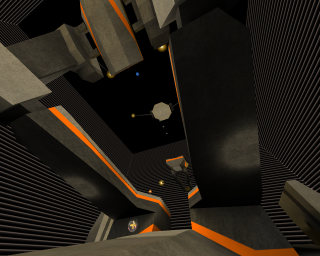
I've been working on a new environment for the piece and helping bots come to terms with the arena. Here's a preview shot. When the work goes live I'll post a video.
Monday, February 13, 2006, 02:58 AM - live
videos in bed, 2005.

Monday, February 13, 2006, 01:00 AM - dev
Ljubljana, 2005

Thursday, February 2, 2006, 10:42 PM - dev
i've been working on a series of moving images designed for use on very large screens.
anagram 1

this composition takes about 10 minutes to complete a cycle and runs indefinitely. it's called "anagram 1" and is designed as an 'recombinational' triptych. it is not interactive in any way.
this is the binary [2.5M]. it runs on a Linux system with graphic acceleration. just run 'anagram1' after unpacking the archive.
here's a small gallery of screenshots.
anagram 2

"anagram 2" takes much longer than the previous work to complete a cycle and spreads the contents of three separate viewports from one to the next to create complex depths of field. using orthoganal cameras, cavities compress and unfold as the architecture pushes through itself. the format of anagram2 is also natively larger.
here's the binary [2.4M]. it runs on a Linux system with graphic acceleration. run 'anagram2' after unpacking the archive.
here's a gallery of anagram 2.
Thursday, February 2, 2006, 10:18 PM - dev
2002-3
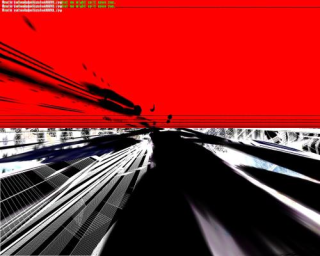
q3apaint uses software bots in Quake3 arena to dynamically create digital paintings.
I use the term 'paintings' as the manner in which colour information is applied is very much like the layering of paint given by brush strokes on the canvas. q3apaint exploits a redraw function in the Quake3 Engine so that instead of a scene refreshing it's content as the software camera moves, the information from past frames it allowed to persist.
As bots hunt each other, they produce these paintings. turning a combat arena into a shower of gestural artwork.
The viewer may become the eyes of any given bot as they paint and manipulate the brushes they use. In this way, q3apaint offers a
symbiotic partnership between player and bot in the creation of artwork.
The work is intended for installation in a gallery or public context with a printer. Using a single keypress, the user can capture a frame of the human-bot collaboration and take it home with them.
Visit the gallery.
Thursday, February 2, 2006, 10:11 PM - code
Some fun to be had. To start with try this:
import ossaudiodev

from ossaudiodev import AFMT_S16_LE

from Numeric import *

dsp = ossaudiodev.open('w')

dsp.setfmt(AFMT_S16_LE)

dsp.channels(2)

dsp.speed(22050)

i = 0

x = raw_input("length: ")

x = int(x)

a = arange(x)

while 1:

        # between 200 and 600 is good

        while i < x:

                i = i +1

                b = a[i:]

                dsp.writeall(str(b))

                print i,":",x

        else:

                while i !=0:

                        i = i -1

                        b = a[i:]

                        dsp.writeall(str(b))

                        print i,":",x
Thursday, February 2, 2006, 10:10 PM - code
it's harder than you think!
here it is in python ported from some Java i found online.
Thursday, February 2, 2006, 10:10 PM - code
here's a wifi access point brower i wrote in python for Linux users that prefer to use console applications. i
'll get around to one that roams and pumps based on the best offer.
scent.py
Thursday, February 2, 2006, 10:09 PM - code
here's a little python script to let you know when your laptop battery is running low.
dacpi.py
Thursday, February 2, 2006, 10:08 PM - dotfiles
this rc resources pyzor, spamassin, procmail and gnupg.
~/.muttrc
Thursday, February 2, 2006, 10:07 PM - howtos
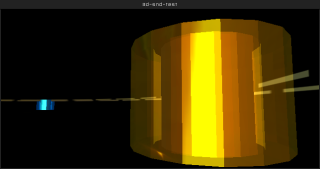
i've been playing around with creating little demo's in blender that explore it's limits for positional (3D) audio. as it goes the limits a
re near and not very interesting. regardless it's perfectly possible to create installations using point based audio. i'm working on a series of
these now. in the meantime here's a little HOWTO blender file..
PKEY in the camera window to play. ARROWKEYS to move, LMB-click and drag to aim (walk/aim stuff nicked from a blender demo file).
for those without blender, but just want to see the results, here is a Linux binary
. just make it executable (with KDE/Gnome or chmod +x file) and click or ./file to play.
Thursday, February 2, 2006, 10:07 PM - dev
2005
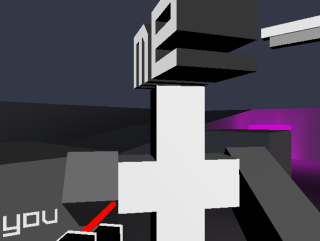
the first person perspective has always been priveledged with the pointillism (or synchronicity) of a physiology that travels with the will in some shape or form, "I act from where I perceive" and "I am on the inside looking out". in this little experiment however, you are on the outside looking in.
in this take on the 2nd Person Perspective, you control yourself through the eyes of the bot, but you do not control the bot; your eyes have effectively been switched. naturally this makes action difficult when you aren't within the bot's field of view. so, both you and the bot (or other player) will need to work together, to combat each other.
there is no project page yet, but downloads and more information are available here.
Thursday, February 2, 2006, 10:06 PM - dev
1999-2000
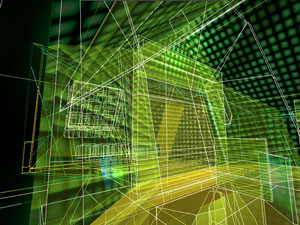
this was my first successful foray into the use of games as performance environments.
it project uses a modified QuakeII computer gaming engine as an environment for mapping and activating audio playback, largely as raw trigger events. it
works well both live and as an installation. I later implemented this project in Half-Life.
the project webpage, and movie are here.
Thursday, February 2, 2006, 10:05 PM - dev
2002/3. designed by Katherine Neil, Kate Wild and myself. built by the EFW team.
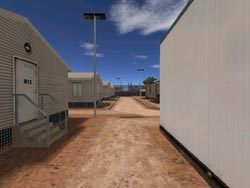
EFW is a Half-Life modification set in the real Australian Woomera detention center. playing as a detainee in subhuman conditions, the goal is to escape.
EFW has appeared in television, newspapers and online journals worldwide. EFW was publically condemned by the Australian Minister for Immigration (the man
responsible for the racist detention regime in Australia), Phillip Ruddock.
Screenshot above (and entire map) developed by Steven Honnegger.
Read more on the project website.
Thursday, February 2, 2006, 10:04 PM - dev
2001->3 selectparks team.
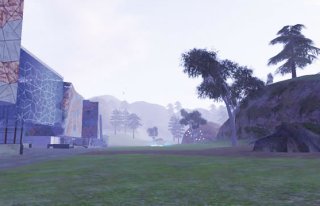
acmipark is a virtual environment that contains a replication of the real world architecture of the Australian Centre for the Moving Image, Melbourne Aust
ralia. acmipark extends the real world architecture of Federation Square into a fantastic abstraction. Subterranean virtual caves hang below the surface,
and a natural landscape replaces the Central Business District in which ACMI actually resides.
It was inspired by the capacity of massive multiplayer online games such as Anarchy Online to create both a sense of place and a sense of community. It is
the first multiplayer, site-specific games-based intervention into public space.
upto 64 players can play simultaneously and though there is a free Win32 client, the game is best played on site at the ACMI center in Melbourne.
visit the project page here or check out this movie.
sadly there wasn't money for a Linux/OSX port and parallel development for these platforms was out of the question as we were sponsored to use Cr
iterion's Renderware.
Thursday, February 2, 2006, 10:03 PM - dev
pix and I, 2004.
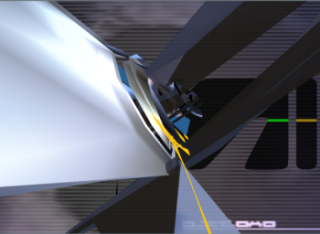
fijuu is a 3D, audio/visual performance engine. using a game engine, the player(s) of fijuu dynamically manipulate 3D instruments with PlayStation2-style
gamepads to make improvised music.
fijuu is built ontop of the open source game engine 'Nebula' and runs on Linux. fijuu (we hope) will one day be released as a live CD Linux proj
ect, so players can simply boot up their PC with a PS2-style gamepad plugged in, and play without installing anything (regardless of operating system).
Among several appearances, fijuu was performed in Sonar2004 and received an Honourable Mention at Transmediale2005.
read more about the project, see screenshots/movies etc here.
Thursday, February 2, 2006, 10:02 PM - dev
pix and i 2003.
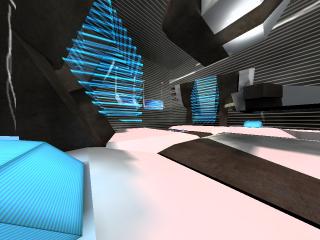
q3apd uses activity in QuakeIII as control data for the realtime audio synthesis environment Pure Data. we have developed a small set of modules that once installed into the appropriate directory, pipe bot and player location, view angle, weapon state and local texture over a network to Pure Data, which is listening on a given port. once this very rich control data is available in PD, it can then be used to synthesise audio, or whatever. the images below are
from a map "gaerwn" that delire put together as a performance environment for q3apd. features in the map like it's dimensions, bounce pads and the placement of textures all make it a dynamic environment for jamming with q3apd. of course any map can be used.
to use q3apd first grab the latest Quake III point release. we used version 1.32. make a directory called 'pd' in /usr/local/games/quake3/, or wherever quake3 is installed on your system [this is the default install path on a Debian system]. then, cd into this new directory and unzip this package of modules ensure that this machine is on the same network as the box with PD on it. run the q3apd.pd in PD on this machine [ping it to be sure]. in the terminal, exec Quake III with:
yourbox:~$ quake3 +set sv_pure 0 +set fs_game pd +devmap (yourmap)
once the map is loaded pull down the console in q3a with the '~' key and type:
/set fudi_hostname localhost
/set fudi_port 6662
/set fudi_open 1
'netsend', an object used in PD and MaxMSP systems to send UDP data over a network, is is now broadcasting. at this stage you should see plenty of activity in the pd patch on the PD machine. enjoy!
system requirements
machine 1 --> Linux / Acellerated Graphics Card / Quake III Arena / ethernet adapter or modem
Tuesday, January 31, 2006, 12:14 AM - live
Nam June Paik passed away on Sunday. He'll be missed. Nam June really opened up the screen.
Sunday, January 22, 2006, 05:34 AM - dev

While rummaging around the crypts of selectparks recently I came across an old work Chad and I cobbled together in a fit of glad madness one night in 2001.
Somehow we had managed to run a KyroII graphics card (a big-shot brand 5 years ago) on the wrong drivers. When I say wrong I mean drivers for an entirely different chipset. Poking and scratching, we were able to run the game Half-Life, and immediately an impossible 2D landscape splintered and bloomed around us. We decided at the time to call it 'Glitch Machinima'.
Find the film here. Accompaning music was added later (can't you tell)...
Original SP page here.
Tuesday, January 17, 2006, 03:26 AM - live
We all reserve the right to be astonished; every time we're astonished the world proves to be larger than we are. This is something we need to affirm in the course of life. Skeptics, you might say, are connoisseurs of astonishment, their tastes are just a little more rarified than others.
Today I was astonished, so much so I had to break from the reflexively secretarial trend of my del.icio.us account, to add a new entry, "extraordinarily-stupid-ideas".
What was the harbinger of this radical departure from dry topics like "howto", "software" and "architecture"?
The Neverending Billboard.
It actually made me feel a little sad upon first witness, a lonely and very real casualty of the internet boom.
The logic appears to travel down this garden path:
I create a site in which people can advertise their products and services by paying for space within an infinitely large internet 'billboard'. While the board is infinitely large, units of my real estate are at a fixed price (mo ho ho ho). People will regularly return to my infinite billboard and choose from which of the plethora of logos they will click, by doing so staying informed with the very latest in online products and services.
Is that the space marked 'Reserved' really there for a buyer working night and day on their logo, one that will surely outshine competition on the worlds most scalable roadside sign?
Sunday, January 15, 2006, 01:59 AM
Here's some coverage of a 1 month intensive in game development I gave at the Technical University of Copenhagen, freshly posted on selectparks proper.
Monday, January 9, 2006, 06:25 PM - howtos
I encountered a strange error when compiling both Blender-2.40 and Mplayer CVS.
/usr/lib/libGL.a(glxcmds.o): In function `glXGetMscRateOML':

undefined reference to `XF86VidModeGetModeLine'
I was initially a bit thrown seeing references to an XFree86 function given I now run X.org. After poking around in all the wrong places (were Blender and MPlayer still being built against ol' XFree86)? It turns out I needed:
libxxf86vm-dev.
Friday, November 25, 2005, 10:20 PM - log
I've been meaning to put these up for a while: documents of experiments in the extents of the Ogre3D material framework, pix's 'OgreOSC' implementation and particle systems (both his and the native Ogre3D PS) while working on the TRG project. This was all done around a year ago now, preserved here for some semblance of posterity. Ogre3D has since grown alot and is currently serving as the basis for the next generation of the fijuu project. Examples below using OSC were driven with PD as the control interface.material-skin A demo using wave_xform to manipulate textures to an oscillation pattern across two dimensions whose periods are out of phase. The material is scrolled across a static convolved mesh creating interference patterns.
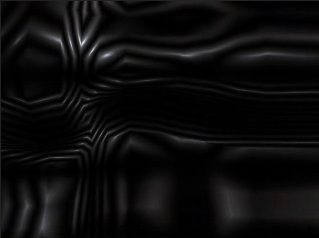
The syntax is simplistic and easy to work with. Here's an example as used for the above movie:
material tmp/xform

{

    technique

    {

            pass

            {

                    scene_blend add

                    depth_write off

                     texture_unit

                    {

                            texture some.png

                            wave_xform scroll_x sine 1.0 0.02 0.0 0.5

                            wave_xform rotate sine 0.0 0.02 0.0 1.0

                            env_map planar

                    }

            }

      }

}
material-wine The same as above, but exploring alpha layers and some new blend modes
particle-glint A short life particle system using native ogre particle functions. Linear force along y causes particles to rise up as they expire while new particles are seeded within fixed bounds below.
particle-hair Altering the particle length and using colour blending to give the effect of hair/rays.
particle-horiz Another version of above. reasonably pointless.
particle-hair2 Hair effect with more body 'n' shine.
particle-bloom a remix of pix's swarm effect using a few blend modes, force affectors and some texture processing.
particle-bloempje another remix of pix's swarm effect.
techno-tentacle example of using OSC to drive animation tracks. Here pitch analysis on an arbitrary audio track is passed to OSC which then controls playback period and mix weights between two armature animation tracks. Tentacles dance around as though Pixar was paying me. The tentacle has about 30 bones and has been instantiated 12 times in the scene. Individual control is possible as are the use of more animation tracks.
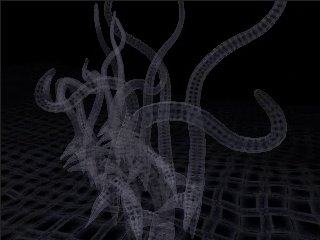
animated-textures basic example of animated textures in use.
animated-textures-LSCM another example of animated textures in use but on a mesh of 382 faces. the mesh has been LSCM unwrapped to create 'seamless' UV coords.
Friday, November 18, 2005, 06:00 PM - howtos
Perhaps a less known fact that the UNIX program 'tree' (that prints the fs hierachy to stdout) actually has an HTML formatting option that can come in handy if you quickly want to generate singular overview of a location in your filesystem complete with links. Here's an example of the below command run from within /home/delire/share/musiq on my local machine; naturally none of the links will work for this reason.
tree -T "browse my "`pwd` -dHx `pwd` -o /tmp/out.html
Friday, November 18, 2005, 05:39 PM - howtos
After developing several facial spasms trying to trying to find a simple means of re-orientating video (for some reason it comes off our Canon A70 camera -90) I discovered mencoder has an easy solution:
mencoder original.avi -o target.avi -oac copy -ovc lavc -vf rotate=2
Worth noting are the other values for rotate, which also provides flipping. I can't see an easy way to do this with transcode, oh well.
Friday, November 18, 2005, 05:15 PM - live
About time I confess that this is/can be a blog. here goes.
Fijuu, young wine, Krsko.
Just returned from giving a short talk and performance at the very well facilitated Mladinski Center. Marta worked the sequencer brilliantly, while I noodled on the meshwarp instruments. The sequencer was the star of the night - locals coming up later and toying with it for hours afterwards. Later we headed off up into the hills to a vinyard where the fine folk from MC roasted us Chestnuts and told us Bosnian jokes (no, not jokes about Bosnians) We were given a very special performance there by a local programmer, but for the integrity of my hosts, I'll keep it secret..
FRAKTALE IV
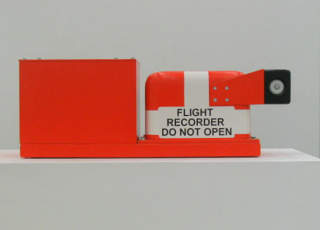
Blind Passenger Oliver Van Den Berg (an on board flight recorder)
Went to an edition of the exhibition series FRAKTALE at the Palast Der Republik here in Berlin, which closes for public entry alogether tomorrow. The exhibition was truly excellent. The show was sparsely distributed throughout one wing of the otherwise completely desolate shell of the Palace's former glory. Sound from a video of an RC Helicopter thrashing to itself to peices on the ground moaned throughout the building, a stubborn machine grieving at it's incapacity. Some very beautiful structural interventions (I wonder whether they will launch the bike at the beginning of this helicoid) .
A day later and I'm still haunted, underscored perhaps by the fact the entire Palace is being pulled down to be replaced by a reconstruction of a 14C Prussian Palace that existed there formerly. Despite the fact that the Palast der Republik is riddled with asbestos it does seem ironic that one heritage site is being pulled down to make way for a reconstruction of a building that once existed in the same location. I'm sure there's more poltical custard and soggy money to this story, but from the perspective of a badly disguised and poorly researched tourist, it does seem a bit strange.
Thursday, September 8, 2005, 09:20 PM - howtos

Adding network transparency to blender interfaces and games is reasonably easy with Wiretap's Python OSC implementation. Therein blender projects can be used to control remote devices, video and audio synthesis environments like those made in PD,even elements of other blender scenes - and vice versa. Here's one way to get there.
Grab pyKit.zip from the above URL, extract and copy OSC.py into your python path (eg /usr/lib/python-<version>/) or simply into the folder your blender project will be executed from.
Add an 'Empty' to your blender scene, add a sensor and a Python controller. Import the OSC module in your Python controller and write a function to handle message sending. Finally, call this function in your gamecode. Something like this:
import OSC

import socket

import GameLogic

import Rasterizer


# a name for our controller

c = GameLogic.getCurrentController()

# a name for our scene

scene = GameLogic.getCurrentScene()

# find an object in the scene to manipulate

obj = scene.getObjectList()["OBMyObject"]

# setup our mouse movement sensor

mouseMove = c.getSensor("mouseMove")


# prep some variables for mouse input control

mult = (-0.01, 0.01) # <-- a sensitivity multiplier

x = (Rasterizer.getWindowWidth()/2-mouseMove.getXPosition())*mult[0]

y = (Rasterizer.getWindowHeight()/2-mouseMove.getYPosition())*mult[1]


# prep a variable for our port

port = 4950

# make some room for the hostname (see OSC.py).

hostname = None

# an example address and URL

address = "/obj"

remote = "foo.url"


# OSC send function adapted from pyKit suggestion.

def OSCsend(remote, address, message):

    s = socket.socket(socket.AF_INET, socket.SOCK_DGRAM)

    print "sending lines to", remote, "(osc: %s)" % address

    osc = OSC.OSCMessage()

    osc.setAddress(address)

    osc.append(message)

    data = osc.getBinary()

    s.sendto(data, remote)


# a condition for calling the function.

if mouseMove.isPositive():

    obj.setPosition((x,y, 0.0)) # <--- follow the mouse

# now call the function.

    OSCsend((remote, port), "/XPos", obj.getPosition()[0])

    OSCsend((remote, port), "/YPos", obj.getPosition()[1])
The screenshot above is from a blender file that puts the above into practice. Grab it here. There's no guarantee physics will work on any other version of blender than 2.36.
For those of you not familar with blender, here's the runtime file, just
chmod +x and ./blend2OSC. (Linux only). You may need a lib or two on board to play. There are no instructions, just move the mouse around and watch the OSC data pour out.
In this demo, collision events, orientation of objects and object position are captured.
The orientation I'm sending is pretty much useless without the remaining rotation axes. It was too tedious to write it up - you get the idea.
To send all this to your PD patch or other application, just set your OSC listener to port
4950 on localhost. Here is a PD patch I put together to
demo this. Manipulate the variable 'remote' in the blend2OSC.blend Python code to send control data to any other machine.
Wednesday, September 7, 2005, 02:04 AM - howtos
Here's a little demo of 'physical' audio sequencing using blender. This will become more interesting to play with over time, at the moment it's merely a proof of concept. Blender is a perfect environment to rapidly prototype this sort of thing. There's not a line of code I needed to write to get this up and running.

Playing around with restitution and force vectors is when things start to become a little more interesting in the context of a rythmical sequencing environment. I'm also toying with OSC and Python to allow for several users to stimulate, rather than control, the physical conditions the beat elements are exposed to.
Have a play with this in the meantime. It's Linux only.. 'chmod +x' or rightclick (KDE/Gnome) and make executable, Those of you familiar with blender grab the blender file here. Make sure volume is up. First 'bounce' will be loud however so watch out!
Instructions for play.
RKEY - Rotates the view. 1KEY...6KEY move the 'paddles'.
back next