Thursday, September 8, 2005, 09:20 PM - howtos

Adding network transparency to blender interfaces and games is reasonably easy with Wiretap's Python OSC implementation. Therein blender projects can be used to control remote devices, video and audio synthesis environments like those made in PD,even elements of other blender scenes - and vice versa. Here's one way to get there.
Grab pyKit.zip from the above URL, extract and copy OSC.py into your python path (eg /usr/lib/python-<version>/) or simply into the folder your blender project will be executed from.
Add an 'Empty' to your blender scene, add a sensor and a Python controller. Import the OSC module in your Python controller and write a function to handle message sending. Finally, call this function in your gamecode. Something like this:
import OSC

import socket

import GameLogic

import Rasterizer


# a name for our controller

c = GameLogic.getCurrentController()

# a name for our scene

scene = GameLogic.getCurrentScene()

# find an object in the scene to manipulate

obj = scene.getObjectList()["OBMyObject"]

# setup our mouse movement sensor

mouseMove = c.getSensor("mouseMove")


# prep some variables for mouse input control

mult = (-0.01, 0.01) # <-- a sensitivity multiplier

x = (Rasterizer.getWindowWidth()/2-mouseMove.getXPosition())*mult[0]

y = (Rasterizer.getWindowHeight()/2-mouseMove.getYPosition())*mult[1]


# prep a variable for our port

port = 4950

# make some room for the hostname (see OSC.py).

hostname = None

# an example address and URL

address = "/obj"

remote = "foo.url"


# OSC send function adapted from pyKit suggestion.

def OSCsend(remote, address, message):

    s = socket.socket(socket.AF_INET, socket.SOCK_DGRAM)

    print "sending lines to", remote, "(osc: %s)" % address

    osc = OSC.OSCMessage()

    osc.setAddress(address)

    osc.append(message)

    data = osc.getBinary()

    s.sendto(data, remote)


# a condition for calling the function.

if mouseMove.isPositive():

    obj.setPosition((x,y, 0.0)) # <--- follow the mouse

# now call the function.

    OSCsend((remote, port), "/XPos", obj.getPosition()[0])

    OSCsend((remote, port), "/YPos", obj.getPosition()[1])
The screenshot above is from a blender file that puts the above into practice. Grab it here. There's no guarantee physics will work on any other version of blender than 2.36.
For those of you not familar with blender, here's the runtime file, just
chmod +x and ./blend2OSC. (Linux only). You may need a lib or two on board to play. There are no instructions, just move the mouse around and watch the OSC data pour out.
In this demo, collision events, orientation of objects and object position are captured.
The orientation I'm sending is pretty much useless without the remaining rotation axes. It was too tedious to write it up - you get the idea.
To send all this to your PD patch or other application, just set your OSC listener to port
4950 on localhost. Here is a PD patch I put together to
demo this. Manipulate the variable 'remote' in the blend2OSC.blend Python code to send control data to any other machine.
| permalink
Wednesday, September 7, 2005, 02:04 AM - howtos
Here's a little demo of 'physical' audio sequencing using blender. This will become more interesting to play with over time, at the moment it's merely a proof of concept. Blender is a perfect environment to rapidly prototype this sort of thing. There's not a line of code I needed to write to get this up and running.

Playing around with restitution and force vectors is when things start to become a little more interesting in the context of a rythmical sequencing environment. I'm also toying with OSC and Python to allow for several users to stimulate, rather than control, the physical conditions the beat elements are exposed to.
Have a play with this in the meantime. It's Linux only.. 'chmod +x' or rightclick (KDE/Gnome) and make executable, Those of you familiar with blender grab the blender file here. Make sure volume is up. First 'bounce' will be loud however so watch out!
Instructions for play.
RKEY - Rotates the view. 1KEY...6KEY move the 'paddles'.
Thursday, February 2, 2006, 10:00 PM
2002-3
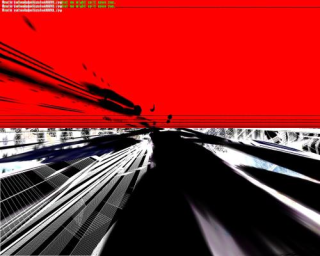
q3apaint uses software bots in Quake3 arena to dynamically create digital paintings.
I use the term 'paintings' as the manner in which colour information is applied is very much like the layering of paint given by brush strokes o
n the canvas. q3apaint exploits a redraw function in the Quake3 Engine so that instead of a scene refreshing it's content as the software camera move
s, the information from past frames it allowed to persist.
As bots hunt each other, they produce these paintings. turning a combat arena into a shower of gestural artwork.
The viewer may become the 'eyes' of any given bot as they paint and manipulate the 'brushes' they use. In this way, q3apaint offers a
symbiotic partnership between player and bot in the creation of artwork.
The work is intended for installation in a gallery or public context with a printer. Using a single keypress, the user can capture a frame of the human-bo
t collaboration and take it home with them.
Visit the gallery.
back