Friday, November 25, 2005, 10:20 PM - log
I've been meaning to put these up for a while: documents of experiments in the extents of the Ogre3D material framework, pix's 'OgreOSC' implementation and particle systems (both his and the native Ogre3D PS) while working on the TRG project. This was all done around a year ago now, preserved here for some semblance of posterity. Ogre3D has since grown alot and is currently serving as the basis for the next generation of the fijuu project. Examples below using OSC were driven with PD as the control interface.material-skin A demo using wave_xform to manipulate textures to an oscillation pattern across two dimensions whose periods are out of phase. The material is scrolled across a static convolved mesh creating interference patterns.
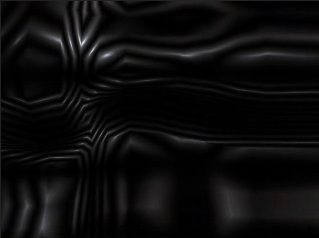
The syntax is simplistic and easy to work with. Here's an example as used for the above movie:
material tmp/xform

{

    technique

    {

            pass

            {

                    scene_blend add

                    depth_write off

                     texture_unit

                    {

                            texture some.png

                            wave_xform scroll_x sine 1.0 0.02 0.0 0.5

                            wave_xform rotate sine 0.0 0.02 0.0 1.0

                            env_map planar

                    }

            }

      }

}
material-wine The same as above, but exploring alpha layers and some new blend modes
particle-glint A short life particle system using native ogre particle functions. Linear force along y causes particles to rise up as they expire while new particles are seeded within fixed bounds below.
particle-hair Altering the particle length and using colour blending to give the effect of hair/rays.
particle-horiz Another version of above. reasonably pointless.
particle-hair2 Hair effect with more body 'n' shine.
particle-bloom a remix of pix's swarm effect using a few blend modes, force affectors and some texture processing.
particle-bloempje another remix of pix's swarm effect.
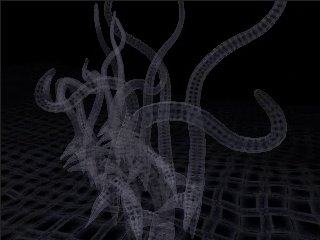
techno-tentacle example of using OSC to drive animation tracks. Here pitch analysis on an arbitrary audio track is passed to OSC which then controls playback period and mix weights between two armature animation tracks. Tentacles dance around as though Pixar was paying me. The tentacle has about 30 bones and has been instantiated 12 times in the scene. Individual control is possible as are the use of more animation tracks.
animated-textures basic example of animated textures in use.
animated-textures-LSCM another example of animated textures in use but on a mesh of 382 faces. the mesh has been LSCM unwrapped to create 'seamless' UV coords.
| permalink
Friday, November 18, 2005, 06:00 PM - howtos
Perhaps a less known fact that the UNIX program 'tree' (that prints the fs hierachy to stdout) actually has an HTML formatting option that can come in handy if you quickly want to generate singular overview of a location in your filesystem complete with links. Here's an example of the below command run from within /home/delire/share/musiq on my local machine; naturally none of the links will work for this reason.
tree -T "browse my "`pwd` -dHx `pwd` -o /tmp/out.html
Friday, November 18, 2005, 05:39 PM - howtos
After developing several facial spasms trying to trying to find a simple means of re-orientating video (for some reason it comes off our Canon A70 camera -90) I discovered mencoder has an easy solution:
mencoder original.avi -o target.avi -oac copy -ovc lavc -vf rotate=2
Worth noting are the other values for rotate, which also provides flipping. I can't see an easy way to do this with transcode, oh well.
Friday, November 18, 2005, 05:15 PM - live
About time I confess that this is/can be a blog. here goes.
Fijuu, young wine, Krsko.
Just returned from giving a short talk and performance at the very well facilitated Mladinski Center. Marta worked the sequencer brilliantly, while I noodled on the meshwarp instruments. The sequencer was the star of the night - locals coming up later and toying with it for hours afterwards. Later we headed off up into the hills to a vinyard where the fine folk from MC roasted us Chestnuts and told us Bosnian jokes (no, not jokes about Bosnians) We were given a very special performance there by a local programmer, but for the integrity of my hosts, I'll keep it secret..
FRAKTALE IV
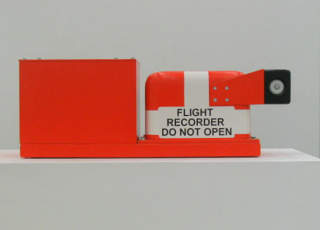
Blind Passenger Oliver Van Den Berg (an on board flight recorder)
Went to an edition of the exhibition series FRAKTALE at the Palast Der Republik here in Berlin, which closes for public entry alogether tomorrow. The exhibition was truly excellent. The show was sparsely distributed throughout one wing of the otherwise completely desolate shell of the Palace's former glory. Sound from a video of an RC Helicopter thrashing to itself to peices on the ground moaned throughout the building, a stubborn machine grieving at it's incapacity. Some very beautiful structural interventions (I wonder whether they will launch the bike at the beginning of this helicoid) .
A day later and I'm still haunted, underscored perhaps by the fact the entire Palace is being pulled down to be replaced by a reconstruction of a 14C Prussian Palace that existed there formerly. Despite the fact that the Palast der Republik is riddled with asbestos it does seem ironic that one heritage site is being pulled down to make way for a reconstruction of a building that once existed in the same location. I'm sure there's more poltical custard and soggy money to this story, but from the perspective of a badly disguised and poorly researched tourist, it does seem a bit strange.
Thursday, September 8, 2005, 09:20 PM - howtos

Adding network transparency to blender interfaces and games is reasonably easy with Wiretap's Python OSC implementation. Therein blender projects can be used to control remote devices, video and audio synthesis environments like those made in PD,even elements of other blender scenes - and vice versa. Here's one way to get there.
Grab pyKit.zip from the above URL, extract and copy OSC.py into your python path (eg /usr/lib/python-<version>/) or simply into the folder your blender project will be executed from.
Add an 'Empty' to your blender scene, add a sensor and a Python controller. Import the OSC module in your Python controller and write a function to handle message sending. Finally, call this function in your gamecode. Something like this:
import OSC

import socket

import GameLogic

import Rasterizer


# a name for our controller

c = GameLogic.getCurrentController()

# a name for our scene

scene = GameLogic.getCurrentScene()

# find an object in the scene to manipulate

obj = scene.getObjectList()["OBMyObject"]

# setup our mouse movement sensor

mouseMove = c.getSensor("mouseMove")


# prep some variables for mouse input control

mult = (-0.01, 0.01) # <-- a sensitivity multiplier

x = (Rasterizer.getWindowWidth()/2-mouseMove.getXPosition())*mult[0]

y = (Rasterizer.getWindowHeight()/2-mouseMove.getYPosition())*mult[1]


# prep a variable for our port

port = 4950

# make some room for the hostname (see OSC.py).

hostname = None

# an example address and URL

address = "/obj"

remote = "foo.url"


# OSC send function adapted from pyKit suggestion.

def OSCsend(remote, address, message):

    s = socket.socket(socket.AF_INET, socket.SOCK_DGRAM)

    print "sending lines to", remote, "(osc: %s)" % address

    osc = OSC.OSCMessage()

    osc.setAddress(address)

    osc.append(message)

    data = osc.getBinary()

    s.sendto(data, remote)


# a condition for calling the function.

if mouseMove.isPositive():

    obj.setPosition((x,y, 0.0)) # <--- follow the mouse

# now call the function.

    OSCsend((remote, port), "/XPos", obj.getPosition()[0])

    OSCsend((remote, port), "/YPos", obj.getPosition()[1])
The screenshot above is from a blender file that puts the above into practice. Grab it here. There's no guarantee physics will work on any other version of blender than 2.36.
For those of you not familar with blender, here's the runtime file, just
chmod +x and ./blend2OSC. (Linux only). You may need a lib or two on board to play. There are no instructions, just move the mouse around and watch the OSC data pour out.
In this demo, collision events, orientation of objects and object position are captured.
The orientation I'm sending is pretty much useless without the remaining rotation axes. It was too tedious to write it up - you get the idea.
To send all this to your PD patch or other application, just set your OSC listener to port
4950 on localhost. Here is a PD patch I put together to
demo this. Manipulate the variable 'remote' in the blend2OSC.blend Python code to send control data to any other machine.
Wednesday, September 7, 2005, 02:04 AM - howtos
Here's a little demo of 'physical' audio sequencing using blender. This will become more interesting to play with over time, at the moment it's merely a proof of concept. Blender is a perfect environment to rapidly prototype this sort of thing. There's not a line of code I needed to write to get this up and running.

Playing around with restitution and force vectors is when things start to become a little more interesting in the context of a rythmical sequencing environment. I'm also toying with OSC and Python to allow for several users to stimulate, rather than control, the physical conditions the beat elements are exposed to.
Have a play with this in the meantime. It's Linux only.. 'chmod +x' or rightclick (KDE/Gnome) and make executable, Those of you familiar with blender grab the blender file here. Make sure volume is up. First 'bounce' will be loud however so watch out!
Instructions for play.
RKEY - Rotates the view. 1KEY...6KEY move the 'paddles'.
Thursday, February 2, 2006, 10:00 PM
2002-3
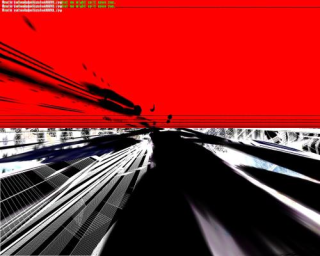
q3apaint uses software bots in Quake3 arena to dynamically create digital paintings.
I use the term 'paintings' as the manner in which colour information is applied is very much like the layering of paint given by brush strokes o
n the canvas. q3apaint exploits a redraw function in the Quake3 Engine so that instead of a scene refreshing it's content as the software camera move
s, the information from past frames it allowed to persist.
As bots hunt each other, they produce these paintings. turning a combat arena into a shower of gestural artwork.
The viewer may become the 'eyes' of any given bot as they paint and manipulate the 'brushes' they use. In this way, q3apaint offers a
symbiotic partnership between player and bot in the creation of artwork.
The work is intended for installation in a gallery or public context with a printer. Using a single keypress, the user can capture a frame of the human-bo
t collaboration and take it home with them.
Visit the gallery.
back